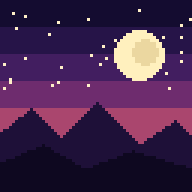

A good pixel art wallpaper is built pixel by pixel on purpose, saved in a lossless format, and sized to the screen it will live on. Get those three things right and the image stays crisp on your phone, tablet or desktop. This guide covers what separates real pixel art from a blurry low-res image, which sizes to download, which themes work, and how to set a wallpaper so your icons don't bury the best part of it.
TL;DR
- Real pixel art uses deliberately placed pixels and a limited palette. A photo shrunk until it looks blocky is not the same thing.
- Match the wallpaper to your device: 9:16-style files for phones, roughly 4:3 for tablets, 16:9 or larger for desktops.
- Choose PNG over JPEG when you can. Lossless files keep hard pixel edges clean.
- Keep the busiest detail away from the center and the top and bottom edges, where clocks, icons and docks sit.
- We offer themed collections plus a free daily wallpaper at Pixel by Pixel Art, so you can see the style on your own screen first.
Table of Contents
- What pixel art wallpaper actually is
- Pixelated art wallpaper styles and themes people love
- Pixel art wallpaper ideas by device
- The right size and aspect ratio
- What to check before you download
- How to set a pixel art wallpaper without losing the good parts
- Animated pixel art wallpapers: what to expect
- Our perspective
- Get a themed set for every screen
- Quick checklist for choosing your wallpaper
- FAQ
- Sources
What pixel art wallpaper actually is
Pixel art is digital art in which individual pixels are the building blocks and are placed intentionally. Wikipedia's overview of pixel art describes visible pixels and deliberate placement as what set it apart from ordinary digital imagery or a low-resolution photograph. That is the practical test for wallpapers too. If an artist chose each block of color, it is pixel art. If a normal picture was simply enlarged until the squares show, it isn't.
The look comes from constraints. Pixel art typically works with a small canvas and a limited number of colors, which is why a good scene feels graphic and readable even at a glance. A sunset made of eight or twelve carefully chosen shades can feel richer than a photo with millions of colors, because every shade has a job.

Pixel art backgrounds vs. wallpapers
People search for "backgrounds" and "wallpapers" interchangeably, but there is a difference in use. Pixel art backgrounds are often made for games, websites or video calls, where a scene sits behind characters or text. A wallpaper has a different job: it sits behind app icons, widgets, a clock and a dock. That means a wallpaper needs calm areas, a clear focal point, and a shape that matches your screen. A scene that looks great as a game level can feel cluttered once twenty icons land on top of it.

Pixelated art wallpaper styles and themes people love
The themes that tend to work best are scenes with a strong silhouette and a simple light source. Here are the families we see readers reach for most.
Cozy scenes
A small room with a lamp glowing, rain on a window, a reading nook, a cat on a windowsill. Cozy pixel art uses warm palettes and low contrast, so it stays gentle behind icons. These work especially well on lock screens, where a quiet image lets the clock stay readable.
Seasonal collections
Autumn forests, Halloween streets with glowing pumpkins, snowy cabins, summer beaches and spring gardens. Seasonal sets are popular because people like to refresh their screens as the year turns. A set of matching scenes lets you swap wallpapers without the look of your devices drifting apart.
Landscapes and skylines
Mountain sunrises, forest paths, ocean sunsets and neon city skylines are the classics. ImagePixelator's idea list names desktop-friendly concepts such as a retro city skyline, forest path, ocean sunset, space station, cozy room and mountain sunrise. Wide scenes like these suit horizontal screens because the eye has room to travel.
Phone-first compositions
Tall, narrow subjects fit portrait screens: floating clouds, a night window, a neon doorway, a flower pattern, a tiny planet. The same source lists these as phone-friendly ideas. The common thread is a single clear subject and plenty of sky or background around it.
Retro and sci-fi
Arcade-style palettes, space stations, synthwave sunsets and tiny robots appeal to anyone who grew up with 8-bit and 16-bit games. Dark versions of these look especially good on dark mode interfaces.
Pixel art wallpaper ideas by device
Ideas that look great on a desktop can fall flat on a phone, and the reverse is true too. Think about the shape first, then the subject.
| Device | Shape | Ideas that work | What to avoid |
|---|---|---|---|
| Phone | Tall, portrait | Night window, clouds, doorway, single character, small planet | Wide panoramas with the subject in the center |
| Tablet | Closer to square | Cozy room, garden, centered landscape with room around it | Extreme crops that cut the subject |
| Desktop | Wide, landscape | Skyline, mountain sunrise, forest path, space station | Busy detail on the left side where files collect |
| Square | Equal sides | Symmetrical scenes, patterns, framed rooms | Subjects pushed to the edge |
Tablets are the awkward middle child. Vixen's guide to wallpaper sizes points out that tablets are neither fully phone-shaped nor fully desktop-shaped, so a wallpaper made without that in mind can look off. A scene with some breathing room around the subject adapts best.
If you're still working out the mood you want, our guide to choosing a phone wallpaper aesthetic walks through colors, contrast and how a wallpaper feels day to day.
The right size and aspect ratio
The short rule: download a file that matches your screen's aspect ratio, and at least its pixel dimensions. Here are common sizes, based on Vixen's device size list:
| Device | Common resolutions |
|---|---|
| Smartphones | 1080×1920, 1170×2532, 1440×3200 |
| Tablets | 1536×2048, 1668×2388 |
| Laptops | 1920×1080, 2560×1600 |
| Desktops | 1920×1080, 2560×1440, 3840×2160 |
| Ultrawide monitors | 3440×1440, 5120×1440 |
Your own device may differ, so check its specs page if you want an exact match. If the aspect ratio is a little off, your device will crop or letterbox the image. That's where a collection that includes several sizes helps: instead of cropping, you pick the file made for your screen. Every purchase from us includes phone, tablet, desktop and square versions for exactly this reason.
Why "bigger" isn't automatically better
Pixel art is usually drawn on a tiny canvas and then enlarged. The enlargement has to be clean. MyClaw's pixel art background guide recommends nearest-neighbor scaling at whole-number multiples such as 2×, 3× or 4×, which keeps every pixel a crisp square. Standard smooth scaling blurs the edges, and blur is the enemy of the style. If a pixel art wallpaper looks soft on your screen, the scaling method is usually the cause, not the art.
What to check before you download
A few quick checks save frustration later.
- File format. Pixel art generally uses a limited color count, and lossless formats are preferred. Wikipedia notes that JPEG is often avoided because compression can add visible artifacts around hard edges. PNG is the safe pick.
- Crisp pixels. Zoom in. Edges should be sharp squares, not smeared gradients.
- Consistent pixel grid. A usable pixel art scene keeps its pixel size consistent, uses a limited palette and keeps contrast restrained behind the main subject, according to MyClaw. Mixed pixel sizes in one image are a sign of a quick filter rather than careful work.
- Right shape for your screen. Match the aspect ratio so nothing important gets cropped.
- Usage rights. Confirm the license covers what you plan to do. Personal use on your own devices is the common case, but selling or redistributing images usually needs separate permission. Our terms of service spell out how our downloads can be used.
How to set a pixel art wallpaper without losing the good parts
Find the focal point first
Vixen's cropping advice is to identify the focal point first and crop around it deliberately. Common mistakes include cropping too tightly, cutting off part of a character and stretching an image instead of resizing it in proportion. Stretching is especially damaging to pixel art, since it makes some pixels wider than others.
Respect the safe zone
On phones, the top and bottom of the screen get crowded with the clock, notifications, camera cutouts and lock-screen widgets. Vixen suggests keeping the important content inside a safe zone about 10% to 15% in from every edge. In practice, that means a pixel moon should sit in the upper middle but below the clock, and a character should stand clear of the dock.
Leave room for icons
A wallpaper needs quiet areas. ImagePixelator advises placing the most detailed subject away from the center if you'll have shortcuts or a dock on top. On a desktop, that often means putting the subject on the right and leaving the left calm for files.
Set it step by step
- Download the file made for your device size.
- Open it in your photo gallery or files app.
- Use the "set as wallpaper" option (on many phones, the three-dot menu) and choose home screen, lock screen or both.
- Preview before confirming. Pinch to reposition only if you must; scaling can soften pixels.
- Check the result with your icons on screen, then adjust the layout if the subject is covered.
Animated pixel art wallpapers: what to expect
Animated pixel art, with rain falling, stars twinkling or a campfire flickering, looks charming, and several of the top results for this topic are live wallpaper galleries. Animation does ask a little more of your device than a still image, since it has to keep drawing frames while the screen is on. Simple loops generally have a small effect on modern phones, and dark scenes on OLED screens can use less power than bright ones. If battery life matters to you, start with a still image on your lock screen and try an animated one on the home screen to see how your own device behaves. Our collections are still images, which keeps them light and works on every device.
Our perspective
We make pixel art wallpapers because a wallpaper is the one piece of art you see dozens of times a day, and it deserves more care than a stretched download.
Our view is simple. Every scene should be pixel art in the true sense: a limited palette, clean blocks and a clear subject. Every collection should hang together, so your phone, tablet and desktop feel like one set. And every download should come in the sizes people actually use, so nobody has to crop and hope.
We create our scenes with AI and then curate them, keeping the ones that meet our quality bar. We group them by season and mood, such as cozy evenings, summer days and Halloween nights, because people choose wallpapers by feeling first and resolution second. And we give away one full-quality scene every day, because we would rather you see the style on your own screen than take our word for it.
If you take one thing from this guide, let it be this: pick the art you want to look at, then match the size to the screen. The rest is details.
Samuel
Get a themed set for every screen
If you want a ready-made look, our Pixel Wallpapers collection offers AI-generated pixel art in themed collections such as Halloween, summer scenes and cozy seasons. Each purchase includes multiple sizes for phone, tablet, desktop and square, and downloads are instant. New drops arrive weekly.

Not ready to buy? Grab the free daily wallpaper, a full-quality scene you can use right away with no commitment, and see how it looks behind your own icons.
Quick checklist for choosing your wallpaper
- Pick the mood: cozy, retro, nature, spooky or seasonal.
- Pick the device and match the aspect ratio.
- Choose PNG or another lossless format.
- Make sure the subject sits inside the safe zone and away from where icons land.
- Use a matching set across your devices for a polished look.
- Rotate with the seasons to keep your screen fresh.
FAQ
What makes a wallpaper pixel art instead of just low resolution?
Pixel art is made with intentional pixel placement, usually with a limited palette. A low-resolution photo only looks blocky because information is missing. In pixel art the blocks are the design, so edges, color choices and shapes feel deliberate.
What size should a pixel art phone wallpaper be?
Common phone sizes include 1080×1920, 1170×2532 and 1440×3200, per Vixen's size guide. Pick the file that matches your phone's aspect ratio. A set that includes several sizes, like ours, removes the guesswork.
Should I download pixel art wallpapers as PNG or JPEG?
PNG is the better choice. It is lossless, so hard pixel edges stay clean, while JPEG compression can add visible artifacts, as Wikipedia's pixel art article notes.
Why does my pixel art wallpaper look blurry?
Usually the image was enlarged with smooth scaling instead of nearest-neighbor scaling at a whole-number multiple, or it was stretched to a different aspect ratio. Use a file made for your screen size, and avoid pinching or stretching it after you set it.
Can I use a free daily wallpaper on all my devices?
Yes for your own personal devices, within the terms on our site. Check our terms of service for what is and isn't allowed, especially if you want to share or reuse an image elsewhere.
Sources
- Pixel art, Wikipedia
- How To Customize Wallpapers for Any Device Size, Vixen
- Pixel Art Background Guide, MyClaw
- Pixel Art Wallpaper: Sizes, Ideas, and Image Tips, ImagePixelator